
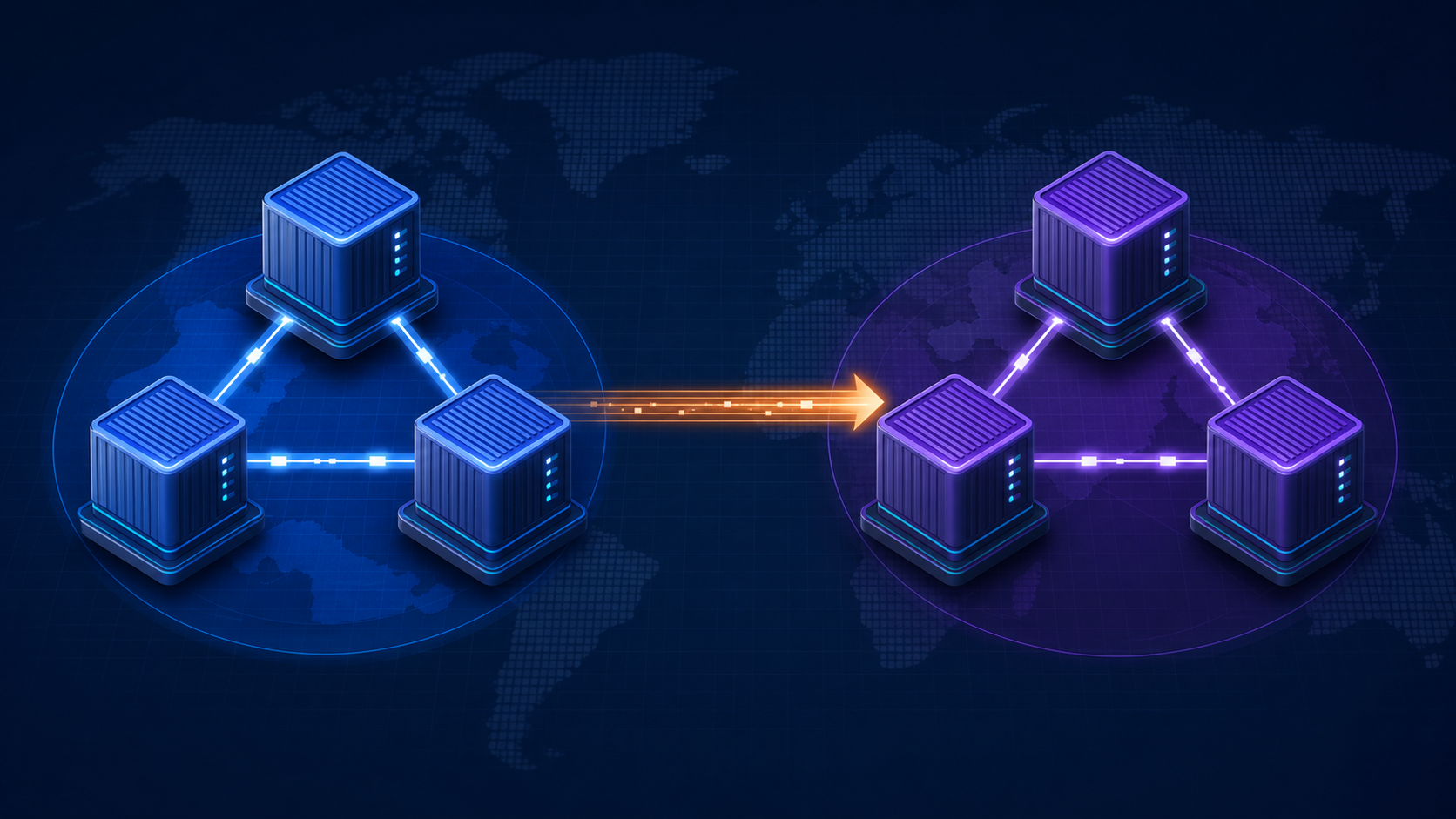
IBM MQ Native HA protects a queue manager from failures inside one site. Cross-Region Replication (CRR) adds a second Native HA group and asynchronously copies recovery-log data to it, providing a disaster-recovery target in another location.
This article builds the complete topology on one Docker host: either an Intel/AMD64 Linux virtual machine or Docker Desktop on macOS. The lab uses six IBM MQ containers: three instances in a group named london and three instances in a group named rome. London starts in the Live role, while Rome starts in the Recovery role.
The single-VM layout is deliberately compact. It lets you study group roles, quorum, TLS-protected replication, recovery backlog, and a planned switchover without first provisioning two data centers.
Lab boundary: this topology demonstrates MQ behavior, not real infrastructure resilience. All six containers share one Docker host, storage subsystem, and failure domain. IBM documents Kubernetes or Red Hat OpenShift as the supported route for self-managed Native HA CRR containers, and recommends the IBM MQ Operator. Use this Docker Compose lab only for learning and development.
1. What this lab builds
The final topology is:
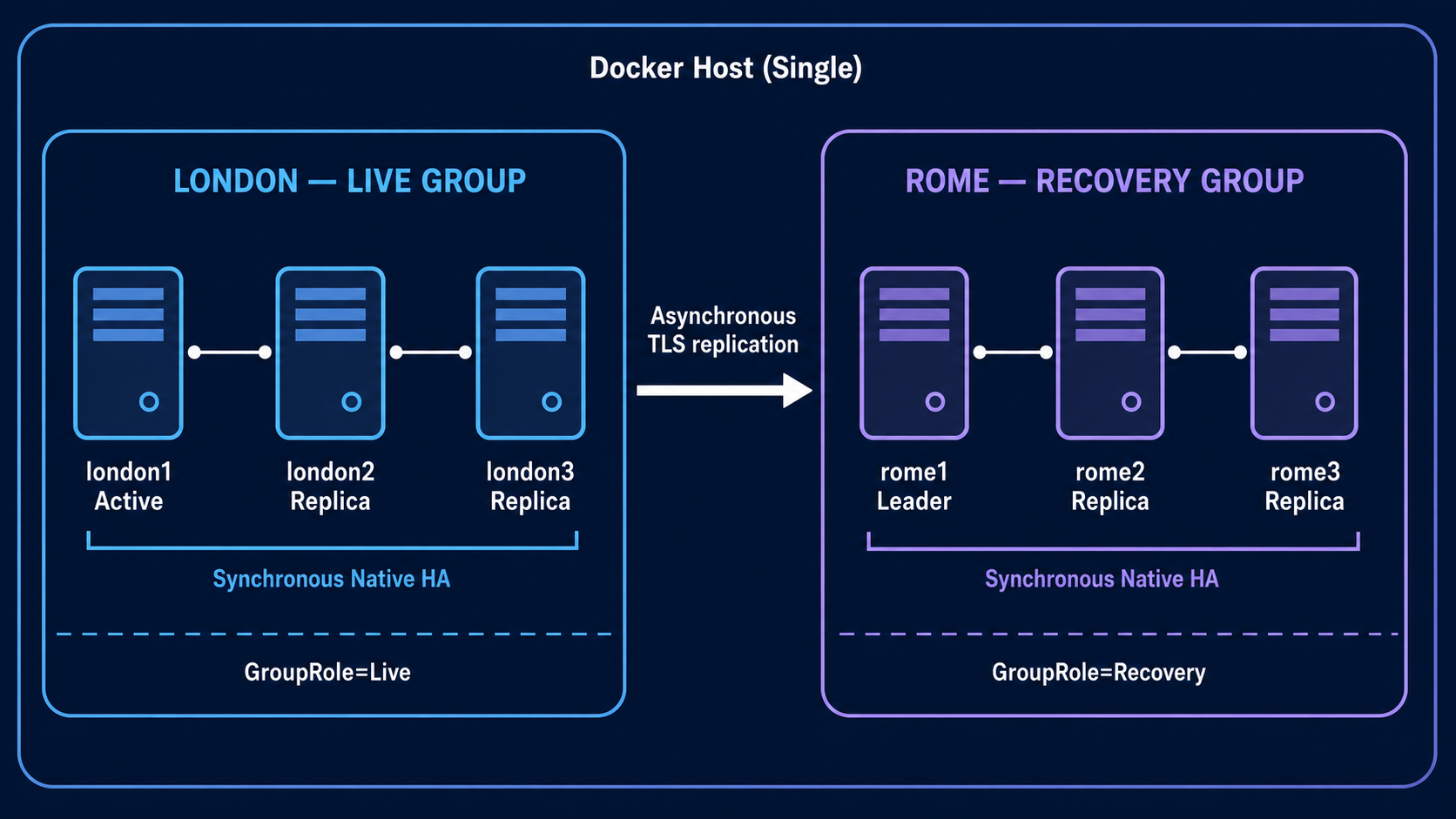
Each group contains three instances of the same queue manager, CRRQM.
- Inside each group, Native HA uses synchronous log replication and quorum.
- Between the groups, CRR uses asynchronous log replication.
- Only the Live group accepts application work.
- The Recovery leader receives log data but does not accept normal MQ application connections.
- A planned switchover coordinates both groups and waits for their logs to match.
This lab validates all of the following:
- Both Native HA groups reach quorum.
- London elects an active queue manager.
- Rome elects a recovery leader.
- The groups connect using TLS.
- A persistent message reaches the recovery group.
- A planned switchover makes Rome Live without losing the message.
2. Requirements and important limitations
Use one of these disposable development hosts:
- An Intel/AMD64 Linux VM whose
uname -moutput isx86_64; or - A Mac running Docker Desktop, including Apple silicon with Docker Desktop's Rosetta support enabled
Allocate:
- At least 12 GB RAM; 16 GB is more comfortable
- At least 30 GB free disk space
- Internet access to
icr.io - Docker Engine and Docker Compose v2 already installed. Installation instructions can be found in Appendix A
Architecture requirement: the prebuilt IBM MQ Advanced for Developers image used here is
linux/amd64. Do not use an ARM64 Linux VM for this lab. On Apple silicon, Docker Desktop manages AMD64 execution inside its own Linux VM. Emulation uses more CPU and memory, so treat the six-node topology as a development exercise rather than a performance test.
CRR needs more storage than a normal Native HA deployment because a recovery group might need space for a log backup during a rebase.
This article uses the IBM MQ Advanced for Developers image. Its license restricts it to development use on a developer machine. Production CRR requires the appropriate IBM MQ Advanced entitlement or the IBM MQ Native HA and Cross-Region Replication add-on. Always verify the current IBM license terms for the environment you intend to run.
The lab pins the IBM MQ 10.0 developer image instead of using latest. Pinning 10.0.0.0-r2 makes the exercise repeatable and ensures that the Linux Native HA CRR capabilities used below are present.
3. Create the lab folder and pull IBM MQ
Create an empty working folder:
mkdir -p "$HOME/mq-crr-lab/config" "$HOME/mq-crr-lab/tls"
cd "$HOME/mq-crr-lab"
Persist the current MQ 10.0 developer image for Compose, then export it for commands in the current shell:
cat > .env <<'EOF'
MQ_IMAGE=icr.io/ibm-messaging/mq:10.0.0.0-r2
EOF

set -a
. ./.env
set +a

printf 'MQ image: <%s>\n' "$MQ_IMAGE"
The angle brackets in the output must contain the complete image reference. Docker Compose reads .env automatically. After opening a new terminal, return to the lab folder and reload the variable before using standalone docker pull or docker run commands:
cd "$HOME/mq-crr-lab"
set -a
. ./.env
set +a
An empty variable causes Docker's invalid reference format error because there is no image argument after the shell expands "$MQ_IMAGE".
Verify that the IBM Container Registry resolves and is reachable:
case "$(uname -s)" in
  Linux) getent ahosts icr.io ;;
  Darwin) dscacheutil -q host -a name icr.io ;;
esac
curl -I https://icr.io/v2/
An HTTP 401 Unauthorized response from /v2/ is expected. It proves that DNS, TCP, TLS, and the registry endpoint are working. Authentication is not required to pull the public developer image.
Pull the image:
docker pull --platform linux/amd64 "$MQ_IMAGE"If Docker on Linux reports a transient lookup icr.io ... no such host error even though the two checks above work, restart the daemon and retry:
sudo systemctl restart docker
docker pull --platform linux/amd64 "$MQ_IMAGE"
On macOS, use Docker Desktop > Troubleshoot > Restart Docker Desktop, then repeat the pull command. Do not run systemctl on macOS.
Confirm the MQ version in the image:
docker run --rm --platform linux/amd64 --entrypoint dspmqver "$MQ_IMAGE"The output should report IBM MQ version 10.0.0.0.
Before starting six instances, prove that one queue manager can start on this host. These commands assume docker version works without sudo. Do not start the container with sudo docker and then poll it with unprivileged docker. Log out and back in after joining the docker group, or use the same access mode consistently for every command.
docker rm -f mq-platform-test >/dev/null 2>&1 || true

docker run -d --name mq-platform-test \
  --platform linux/amd64 \
  -e LICENSE=accept \
  -e MQ_QMGR_NAME=PLATFORMQM \
  "$MQ_IMAGE"

MQ_READY=0
for attempt in $(seq 1 60); do
  if docker exec mq-platform-test \
      dspmq -m PLATFORMQM 2>/dev/null | grep -Fq 'STATUS(Running)'; then
    MQ_READY=1
    break
  fi
  printf '.'
  sleep 3
done
printf '\n'

if [ "$MQ_READY" -eq 1 ]; then
  echo "PLATFORMQM is running."
  docker exec mq-platform-test dspmq -m PLATFORMQM
  docker logs --tail 20 mq-platform-test
  docker rm -f mq-platform-test
else
  echo "The test queue manager did not become ready within three minutes."
  docker logs --tail 100 mq-platform-test
  echo "The container was left running for diagnosis."
fi
This checks the queue manager's actual state with dspmq.
4. Why TLS is part of the lab
IBM MQ requires TLS for log replication between Native HA groups. TLS inside each three-instance group is optional but recommended. To keep the exercise manageable, all six instances use the same self-signed certificate and key repository.
That shortcut is suitable for a disposable lab only. A production design needs proper certificate ownership, separate trust decisions, rotation, revocation, expiration monitoring, and secure handling of key repository passwords.
Create the key database by using the MQ tooling already present in the container image:
docker run --rm --platform linux/amd64 --user 0 \
  -v "$PWD/tls:/work" \
  --entrypoint /bin/bash \
  "$MQ_IMAGE" -lc '
    set -e
    runmqakm -keydb -create \
      -db /work/keystore.kdb \
      -pw passw0rd \
      -stash
    runmqakm -cert -create \
      -db /work/keystore.kdb \
      -pw passw0rd \
      -label nha-qm-replication \
      -dn "CN=CRRQM-REPLICATION" \
      -size 2048
    chmod 644 /work/keystore.*
  '
Check the files:
ls -l tls/keystore.*The key repository path used by MQ omits the .kdb suffix, so the configuration will refer to /etc/mqm/tls/keystore.
5. Create the two Native HA configurations
Every instance needs its own NativeHALocalInstance name. All instances in one group otherwise use the same member list and recovery-group addresses.
Create a small helper script that writes the six configuration files:
cat > make-config.sh <<'SCRIPT'
#!/usr/bin/env bash
set -euo pipefail

mkdir -p config

write_london() {
  local instance=$1
  cat > "config/${instance}.ini" <<EOF
NativeHALocalInstance:
    Name=${instance}
    GroupName=london
    GroupRole=Live
    GroupLocalAddress=(9415)
    CipherSpec=ANY_TLS12
    GroupCipherSpec=ANY_TLS12
    CertificateLabel=nha-qm-replication
    KeyRepository=/etc/mqm/tls/keystore
NativeHAInstance:
    Name=london1
    ReplicationAddress=london1(9414)
NativeHAInstance:
    Name=london2
    ReplicationAddress=london2(9414)
NativeHAInstance:
    Name=london3
    ReplicationAddress=london3(9414)
NativeHARecoveryGroup:
    GroupName=rome
    ReplicationAddress=rome1(9415),rome2(9415),rome3(9415)
    Enabled=Yes
EOF
}

write_rome() {
  local instance=$1
  cat > "config/${instance}.ini" <<EOF
NativeHALocalInstance:
    Name=${instance}
    GroupName=rome
    GroupRole=Recovery
    GroupLocalAddress=(9415)
    CipherSpec=ANY_TLS12
    GroupCipherSpec=ANY_TLS12
    CertificateLabel=nha-qm-replication
    KeyRepository=/etc/mqm/tls/keystore
NativeHAInstance:
    Name=rome1
    ReplicationAddress=rome1(9414)
NativeHAInstance:
    Name=rome2
    ReplicationAddress=rome2(9414)
NativeHAInstance:
    Name=rome3
    ReplicationAddress=rome3(9414)
NativeHARecoveryGroup:
    GroupName=london
    ReplicationAddress=london1(9415),london2(9415),london3(9415)
    Enabled=Yes
EOF
}

for instance in london1 london2 london3; do
  write_london "$instance"
done

for instance in rome1 rome2 rome3; do
  write_rome "$instance"
done
SCRIPT

chmod +x make-config.sh
./make-config.sh
Review one file from each group:
cat config/london1.ini
cat config/rome1.ini
The important CRR attributes are:
| Attribute | Purpose |
|---|---|
GroupName | Identifies the local three-instance group. |
GroupRole | Requests Live or Recovery behavior. |
GroupLocalAddress | Opens the local group-to-group replication endpoint. |
GroupCipherSpec | Requires TLS for the inter-group connection. |
NativeHARecoveryGroup | Names the other group and lists addresses through which MQ can find it. |
Names such as london and rome describe locations rather than roles. This matters because the roles will reverse during the switchover.
6. Create the MQ object configuration
Create a persistent queue and a client channel. The object definitions are applied when the Live queue manager first starts and are then replicated with the queue manager data.
cat > config/20-config.mqsc <<'EOF'
DEFINE QLOCAL('CRR.TEST.QUEUE') DEFPSIST(YES) REPLACE
DEFINE CHANNEL('DEV.APP.SVRCONN') CHLTYPE(SVRCONN) REPLACE
ALTER CHANNEL('DEV.APP.SVRCONN') CHLTYPE(SVRCONN) MCAUSER('mqm')
ALTER QMGR CHLAUTH(DISABLED)
ALTER QMGR CONNAUTH('')
REFRESH SECURITY(*) TYPE(CONNAUTH)
EOF
The relaxed channel security is only for this isolated lab. Do not use it as a production security model.
7. Create the Docker Compose topology
The following Compose file is shared by Intel/AMD64 Linux and Docker Desktop on macOS. platform: linux/amd64 is native on the Linux VM and selects Docker Desktop's AMD64 execution path on Apple silicon. Queue-manager data uses Docker named volumes to avoid host-path ownership differences. Shared read-only bind mounts use the SELinux z option, which Compose ignores on platforms where SELinux is not active.
The services deliberately do not publish MQ ports on the host. Every validation command runs through docker exec, while Native HA and CRR communicate over the private Compose network. This avoids collisions with another local MQ container already using port 1414.
Open a text editor and paste the following content to create the docker-compose.yaml file:
services:
  london1:
    container_name: crr-london1
    hostname: london1
    image: ${MQ_IMAGE:-icr.io/ibm-messaging/mq:10.0.0.0-r2}
    platform: linux/amd64
    environment:
      LICENSE: "accept"
      MQ_QMGR_NAME: "CRRQM"
      MQ_NATIVE_HA: "true"
      MQ_NATIVE_HA_INSTANCE_NAME: "london1"
    volumes:
      - london1-data:/mnt/mqm
      - ./config/london1.ini:/etc/mqm/nativeha.ini:ro,z
      - ./config/20-config.mqsc:/etc/mqm/20-config.mqsc:ro,z
      - ./tls:/etc/mqm/tls:ro,z
    networks: [crrnet]

  london2:
    container_name: crr-london2
    hostname: london2
    image: ${MQ_IMAGE:-icr.io/ibm-messaging/mq:10.0.0.0-r2}
    platform: linux/amd64
    environment:
      LICENSE: "accept"
      MQ_QMGR_NAME: "CRRQM"
      MQ_NATIVE_HA: "true"
      MQ_NATIVE_HA_INSTANCE_NAME: "london2"
    volumes:
      - london2-data:/mnt/mqm
      - ./config/london2.ini:/etc/mqm/nativeha.ini:ro,z
      - ./config/20-config.mqsc:/etc/mqm/20-config.mqsc:ro,z
      - ./tls:/etc/mqm/tls:ro,z
    networks: [crrnet]

  london3:
    container_name: crr-london3
    hostname: london3
    image: ${MQ_IMAGE:-icr.io/ibm-messaging/mq:10.0.0.0-r2}
    platform: linux/amd64
    environment:
      LICENSE: "accept"
      MQ_QMGR_NAME: "CRRQM"
      MQ_NATIVE_HA: "true"
      MQ_NATIVE_HA_INSTANCE_NAME: "london3"
    volumes:
      - london3-data:/mnt/mqm
      - ./config/london3.ini:/etc/mqm/nativeha.ini:ro,z
      - ./config/20-config.mqsc:/etc/mqm/20-config.mqsc:ro,z
      - ./tls:/etc/mqm/tls:ro,z
    networks: [crrnet]

  rome1:
    container_name: crr-rome1
    hostname: rome1
    image: ${MQ_IMAGE:-icr.io/ibm-messaging/mq:10.0.0.0-r2}
    platform: linux/amd64
    environment:
      LICENSE: "accept"
      MQ_QMGR_NAME: "CRRQM"
      MQ_NATIVE_HA: "true"
      MQ_NATIVE_HA_INSTANCE_NAME: "rome1"
    volumes:
      - rome1-data:/mnt/mqm
      - ./config/rome1.ini:/etc/mqm/nativeha.ini:ro,z
      - ./config/20-config.mqsc:/etc/mqm/20-config.mqsc:ro,z
      - ./tls:/etc/mqm/tls:ro,z
    networks: [crrnet]

  rome2:
    container_name: crr-rome2
    hostname: rome2
    image: ${MQ_IMAGE:-icr.io/ibm-messaging/mq:10.0.0.0-r2}
    platform: linux/amd64
    environment:
      LICENSE: "accept"
      MQ_QMGR_NAME: "CRRQM"
      MQ_NATIVE_HA: "true"
      MQ_NATIVE_HA_INSTANCE_NAME: "rome2"
    volumes:
      - rome2-data:/mnt/mqm
      - ./config/rome2.ini:/etc/mqm/nativeha.ini:ro,z
      - ./config/20-config.mqsc:/etc/mqm/20-config.mqsc:ro,z
      - ./tls:/etc/mqm/tls:ro,z
    networks: [crrnet]

  rome3:
    container_name: crr-rome3
    hostname: rome3
    image: ${MQ_IMAGE:-icr.io/ibm-messaging/mq:10.0.0.0-r2}
    platform: linux/amd64
    environment:
      LICENSE: "accept"
      MQ_QMGR_NAME: "CRRQM"
      MQ_NATIVE_HA: "true"
      MQ_NATIVE_HA_INSTANCE_NAME: "rome3"
    volumes:
      - rome3-data:/mnt/mqm
      - ./config/rome3.ini:/etc/mqm/nativeha.ini:ro,z
      - ./config/20-config.mqsc:/etc/mqm/20-config.mqsc:ro,z
      - ./tls:/etc/mqm/tls:ro,z
    networks: [crrnet]

networks:
  crrnet:
    name: mq-crr-network

volumes:
  london1-data:
  london2-data:
  london3-data:
  rome1-data:
  rome2-data:
  rome3-data:
Validate the Docker Compose file before starting anything:
docker compose config --quiet
docker compose pull
8. Start the London Live group
If you have run any earlier version of this lab, we need to start from a genuinely clean state. Execute the following code. It removes all six lab containers, their queue-manager data volumes, and any orphaned containers created from the Compose project. It does not affect unrelated containers or volumes:
docker compose down -v --remove-orphans

docker rm -f \
  crr-london1 crr-london2 crr-london3 \
  crr-rome1 crr-rome2 crr-rome3 \
  2>/dev/null || true

docker network rm mq-crr-network 2>/dev/null || true
The -v option deliberately deletes every message and all queue-manager state from previous runs. Use it here because this procedure is a fresh lab initialization.
Regenerate the six INI files and validate the effective Compose model. The second check must print No host ports published:
./make-config.sh
docker compose config --quiet

if docker compose config | grep -q 'published:'; then
  echo "ERROR: remove every ports: section from docker-compose.yaml"
  docker compose config | grep -n -A 3 -B 2 'published:'
  exit 1
else
  echo "No host ports published"
fi
This check prevents an older Compose file from silently retaining mappings such as 1414:1414. The lab does not require any host port: validation uses docker exec, while Native HA and CRR use the private Compose network.
Now start only London group so it can establish the initial queue manager state:
docker compose up -d london1 london2 london3Follow startup briefly:
docker compose logs --tail=40 london1 london2 london3First confirm that the containers are still running:
docker compose ps -a london1 london2 london3Then check ordinary queue-manager status and instance-level Native HA status.
for c in crr-london1 crr-london2 crr-london3; do
  echo "== $c =="
  docker exec "$c" dspmq -m CRRQM -o status
  docker exec "$c" dspmq -m CRRQM -o nativeha
done
After initialization, expect one ROLE(Active), two ROLE(Replica), QUORUM(3/3), GRPNAME(london), and GRPROLE(Live).
Store the active container name:
LONDON_ACTIVE=$(
  for c in crr-london1 crr-london2 crr-london3; do
    docker exec "$c" dspmq -m CRRQM -o nativeha | \
      grep -q 'ROLE(Active)' && echo "$c" && break
  done
)
echo "London active instance: $LONDON_ACTIVE"
Once LONDON_ACTIVE is non-empty, display the local and remote CRR group records:
docker exec "$LONDON_ACTIVE" dspmq -m CRRQM -o nativeha -gConfirm the test queue exists:
printf 'DISPLAY QLOCAL(CRR.TEST.QUEUE) CURDEPTH DEFPSIST\n' | \
  docker exec -i "$LONDON_ACTIVE" runmqsc CRRQM
If LONDON_ACTIVE is empty, wait 20 seconds, repeat the status command, and inspect the troubleshooting section below.
9. Start the Rome Recovery group
Start the second group:
docker compose up -d rome1 rome2 rome3Check its status:
for c in crr-rome1 crr-rome2 crr-rome3; do
  echo "== $c =="
  docker exec "$c" dspmq -m CRRQM -o status
  docker exec "$c" dspmq -m CRRQM -o nativeha
done
Expect one Rome instance to show ROLE(Leader), the others to show ROLE(Replica), and the group to show GRPNAME(rome), GRPROLE(Recovery), and QUORUM(3/3).
The first synchronization might take time because Rome must establish its recovery copy. Repeat this command until the group connection is normal:
docker exec "$LONDON_ACTIVE" dspmq -m CRRQM -o nativeha -gThe recovery-group portion should eventually include values equivalent to:
GRPNAME(rome) GRPROLE(Recovery) CONNGRP(yes) GRSTATUS(Normal) BACKLOG(0) INSYNC(yes)10. Confirm TLS-protected replication
Search the queue manager logs for secure Native HA connections:
docker exec "$LONDON_ACTIVE" grep -E \
  'AMQ3305I|secure connection|certificate DN' \
  /var/mqm/qmgrs/CRRQM/errors/AMQERR01.LOG || true
You should see messages referring to secure connections and the certificate DN CN=CRRQM-REPLICATION.
If the two groups cannot connect, inspect all recent MQ error logs:
for c in crr-london1 crr-london2 crr-london3 crr-rome1 crr-rome2 crr-rome3; do
  echo "== $c =="
  docker exec "$c" tail -n 25 \
    /var/mqm/qmgrs/CRRQM/errors/AMQERR01.LOG 2>/dev/null || true
done
11. Put a persistent message in London
Put one message on the Live queue manager:
printf 'Message written in London before the CRR switchover\n\n' | \
  docker exec -i "$LONDON_ACTIVE" /opt/mqm/samp/bin/amqsput CRR.TEST.QUEUE CRRQM
Check its depth:
printf 'DISPLAY QLOCAL(CRR.TEST.QUEUE) CURDEPTH\n' | \
  docker exec -i "$LONDON_ACTIVE" runmqsc CRRQM
Before switching roles, confirm again that the recovery status reports BACKLOG(0) and INSYNC(yes):
docker exec "$LONDON_ACTIVE" dspmq -m CRRQM -o nativeha -gCRR is asynchronous, so a successful put on London does not by itself prove that Rome already has the corresponding log record. BACKLOG(0) and INSYNC(yes) are the important checks before a controlled switchover.
12. Perform a planned CRR switchover
A planned switchover coordinates both groups and waits for the recovery logs to match. This is different from an emergency failover, where the original Live site is unavailable and some data loss or split-brain risk can exist.
First request that London move from Live to Recovery:
cat > set-role.sh <<'SCRIPT'
#!/usr/bin/env bash
set -euo pipefail

from_role=$1
to_role=$2
shift 2

for file in "$@"; do
  grep -q "GroupRole=$from_role" "$file" || {
    echo "$file does not request GroupRole=$from_role" >&2
    exit 1
  }
  sed "s/GroupRole=$from_role/GroupRole=$to_role/" "$file" > "$file.tmp"
  mv "$file.tmp" "$file"
done
SCRIPT

chmod +x set-role.sh
./set-role.sh Live Recovery \
  config/london1.ini config/london2.ini config/london3.ini
docker compose restart london1 london2 london3
Check the London status until it reports a pending recovery transition:
for c in crr-london1 crr-london2 crr-london3; do
  docker exec "$c" dspmq -m CRRQM -o nativeha
done
Now request that Rome become Live:
./set-role.sh Recovery Live \
  config/rome1.ini config/rome2.ini config/rome3.ini
docker compose restart rome1 rome2 rome3
During coordination, the groups can report Pending recovery and Pending live. Wait for Rome to elect an active instance:
ROME_ACTIVE=""
for attempt in $(seq 1 30); do
  ROME_ACTIVE=$(
    for c in crr-rome1 crr-rome2 crr-rome3; do
      docker exec "$c" dspmq -m CRRQM -o nativeha | \
        grep -q 'ROLE(Active)' && echo "$c" && break
    done
  )
  [ -n "$ROME_ACTIVE" ] && break
  sleep 5
done
echo "Rome active instance: $ROME_ACTIVE"
Display the final group state:
docker exec "$ROME_ACTIVE" dspmq -m CRRQM -o nativeha -gRome should now show GRPROLE(Live) and London should show GRPROLE(Recovery).
13. Prove that the message followed the queue manager
Read the message from the new Live group:
docker exec -i "$ROME_ACTIVE" /opt/mqm/samp/bin/amqsget CRR.TEST.QUEUE CRRQMThe output should contain:
Message written in London before the CRR switchoverThis demonstrates the complete path:
- London accepted a persistent message.
- Native HA synchronously protected it inside the London group.
- CRR asynchronously copied the corresponding recovery log to Rome.
- The planned switchover synchronized the groups before changing roles.
- Rome activated the same logical queue manager and exposed the message.
14. Switch back to London
To restore the original roles, first request that the current Live group, Rome, become Recovery:
./set-role.sh Live Recovery \
  config/rome1.ini config/rome2.ini config/rome3.ini
docker compose restart rome1 rome2 rome3
Then request that London become Live:
./set-role.sh Recovery Live \
  config/london1.ini config/london2.ini config/london3.ini
docker compose restart london1 london2 london3
Monitor both groups until London again has one ROLE(Active) instance and Rome has one ROLE(Leader) instance:
for c in crr-london1 crr-london2 crr-london3 crr-rome1 crr-rome2 crr-rome3; do
  echo "== $c =="
  docker exec "$c" dspmq -m CRRQM -o nativeha
done
15. Why this lab does not force an unplanned failover
An unplanned CRR failover is a disaster-recovery decision, not simply another container restart. If the Live group is unreachable, the Recovery group cannot prove that it has every final log record or that the old group will remain stopped. Forcing the Recovery group Live can therefore introduce:
- a non-zero recovery point
- lost messages that existed only in the failed site
- two independently active copies of the same queue manager
- partitioned, or split-brain, data that must later be resolved
The safe exercise on a shared VM is the planned switchover above. Study IBM's unplanned failover and split-brain procedures before testing forced promotion, and use separate failure domains when doing so.
16. Troubleshooting
Docker reports port is already allocated
The current Compose file does not publish host ports. If this error appears, the local docker-compose.yaml still contains an older ports: section. Remove the six host mappings, validate, and apply the corrected model without deleting volumes:
docker compose config --quiet
docker compose up -d --remove-orphans london1 london2 london3
Alternatively, identify an unrelated container that owns port 1414 before deciding whether to stop it:
docker ps --filter publish=1414 \
  --format 'table {{.ID}}\t{{.Names}}\t{{.Ports}}'
The -g status command prints nothing
Group-level dspmq -o nativeha -g output is empty when MQ does not consider the queue manager part of a Native HA group. Run these checks without redirecting errors:
docker compose ps -a london1 london2 london3

for c in crr-london1 crr-london2 crr-london3; do
  echo "== $c: MQ status =="
  docker exec "$c" dspmq -m CRRQM -o status
  docker exec "$c" dspmq -m CRRQM -o nativeha
done
If the instance-level output says ROLE(Not configured), verify what the first container received and what MQ applied:
docker inspect crr-london1 \
  --format '{{range .Config.Env}}{{println .}}{{end}}' | grep '^MQ_'

docker exec crr-london1 cat /etc/mqm/nativeha.ini
docker exec crr-london1 grep -n -A12 -E \
  '^NativeHA(LocalInstance|Instance|RecoveryGroup):' \
  /var/mqm/qmgrs/CRRQM/qm.ini

docker compose logs --tail=150 london1 london2 london3
Do not continue to Rome until the three London instance-level commands show one ROLE(Active), two ROLE(Replica), and quorum. If these containers were initialized before the Native HA configuration was correct, use the clean-state procedure below to recreate their disposable data volumes.
A container exits during initialization
Check its logs:
docker compose ps -a
docker compose logs --tail=100 london1
Common causes include insufficient memory, an unreadable keystore, a malformed INI file, or reusing data volumes created with different configuration.
The groups remain disconnected
Confirm Docker DNS resolves all six service names:
docker exec crr-london1 getent hosts rome1 rome2 rome3
docker exec crr-rome1 getent hosts london1 london2 london3
Confirm the TLS files are visible:
docker exec crr-london1 find /etc/mqm/tls -maxdepth 1 \
  -name 'keystore.*' -ls
docker exec crr-rome1 find /etc/mqm/tls -maxdepth 1 \
  -name 'keystore.*' -ls
Then inspect AMQERR01.LOG on the group leaders for certificate, CipherSpec, or connection errors.
A group does not reach quorum
All three members of that group must be running and able to resolve one another on port 9414:
docker compose ps
docker exec crr-london1 getent hosts london2 london3
A role change does not take effect
Verify that all three INI files in the group request the same role:
grep GroupRole config/*.iniThe role is a group decision. A majority must request the same transition, and the two groups must coordinate for a planned switchover.
Start again from a clean state
If this is a disposable lab and initialization data is inconsistent, remove the containers and volumes before retrying:
docker compose down -v --remove-orphans
docker rm -f \
  crr-london1 crr-london2 crr-london3 \
  crr-rome1 crr-rome2 crr-rome3 \
  2>/dev/null || true
docker network rm mq-crr-network 2>/dev/null || true

./make-config.sh
docker compose config --quiet
docker compose config | grep -q 'published:' && {
  echo "ERROR: remove every ports: section from docker-compose.yaml"
  exit 1
}

docker compose up -d london1 london2 london3
docker compose ps -a
Only use down -v when you intentionally want to delete all queue manager data. All three London containers must show Up; a container left in Created state never reached MQ initialization, so inspect its Docker error before examining MQ logs.
17. What the lab demonstrated
Native HA and CRR solve related but different problems:
| Layer | Replication | Main purpose | Transition |
|---|---|---|---|
| Native HA inside London or Rome | Synchronous | Survive an instance or local storage failure | Automatic leader election |
| CRR between London and Rome | Asynchronous | Recover the queue manager in another region | Operator-controlled role change |
The Recovery group is not a second writable queue manager. It is a protected copy of the same logical queue manager, maintained from recovery-log data and promoted through a controlled role transition.
The single-VM arrangement makes those mechanics visible, but a real design must distribute the six instances across two regions, isolate storage and network failure domains, size the recovery site for full production load, expose stable client endpoints, automate monitoring, and rehearse both planned and unplanned procedures.
18. Cleanup
Remove all six containers, the Docker network, and the queue manager volumes:
docker compose down -vRemove the lab files:
cd "$HOME"
rm -rf "$HOME/mq-crr-lab"
The IBM MQ image remains in the local image cache. Remove it only if you no longer need it:
docker image rm icr.io/ibm-messaging/mq:10.0.0.0-r2Appendix A. Install Docker and Compose
Linux Docker Engine
Identify the Linux distribution before choosing installation instructions:
. /etc/os-release
echo "$ID $VERSION_ID"
On Ubuntu or Debian, use Docker's official APT repository. The distribution repositories do not consistently provide docker-compose-plugin; therefore, do not combine docker.io with that package name.
(
set -e

. /etc/os-release
case "$ID" in
  ubuntu)
    DOCKER_DIST=ubuntu
    DOCKER_CODENAME=${UBUNTU_CODENAME:-$VERSION_CODENAME}
    ;;
  debian)
    DOCKER_DIST=debian
    DOCKER_CODENAME=$VERSION_CODENAME
    ;;
  *)
    echo "This APT block supports Ubuntu and Debian, not $ID."
    exit 1
    ;;
esac

sudo apt-get update
sudo apt-get install -y ca-certificates curl
sudo install -m 0755 -d /etc/apt/keyrings
sudo curl -fsSL "https://download.docker.com/linux/$DOCKER_DIST/gpg" \
  -o /etc/apt/keyrings/docker.asc
sudo chmod a+r /etc/apt/keyrings/docker.asc

ARCH=$(dpkg --print-architecture)
sudo tee /etc/apt/sources.list.d/docker.sources >/dev/null <<EOF
Types: deb
URIs: https://download.docker.com/linux/$DOCKER_DIST
Suites: $DOCKER_CODENAME
Components: stable
Architectures: $ARCH
Signed-By: /etc/apt/keyrings/docker.asc
EOF

sudo apt-get update
apt-cache policy docker-ce docker-compose-plugin
sudo apt-get install -y \
  docker-ce \
  docker-ce-cli \
  containerd.io \
  docker-buildx-plugin \
  docker-compose-plugin

sudo systemctl enable --now docker
)
The parentheses run the installation in a subshell. Its set -e stops that installation if a command fails, instead of continuing to systemctl and producing the misleading Unit file docker.service does not exist message; it does not leave error-exit mode enabled in your interactive shell. For other Linux distributions, follow Docker's installation instructions for that distribution rather than adapting the APT commands.
If your Linux user is not allowed to access Docker, add it to the docker group:
sudo usermod -aG docker "$USER"
newgrp docker
Verify the tools:
docker version
docker compose version
uname -m
The Linux VM must report x86_64. This article does not support running the lab inside an ARM64 Linux VM.
Docker Desktop on macOS
Install the Apple silicon or Intel build of Docker Desktop that matches the Mac. Docker Desktop already includes Docker Engine, the Docker CLI, and Compose v2.
On Apple silicon, open Docker Desktop > Settings > General:
- Select Apple Virtualization Framework as the virtual machine manager.
- Enable Use Rosetta for x86_64/amd64 emulation on Apple Silicon.
- Do not select Docker VMM for this lab because it does not currently provide Rosetta acceleration for AMD64 containers.
In Settings > Resources, assign at least 6 CPUs and 12 GB RAM; 8 CPUs and 16 GB RAM are preferable. Apply the changes and restart Docker Desktop.
Verify Docker, Compose, AMD64 container startup, and docker exec:
docker version
docker compose version
docker run --rm --platform linux/amd64 alpine:3.21 uname -m
docker run -d --name amd64-exec-test --platform linux/amd64 alpine:3.21 sleep 60
docker exec amd64-exec-test uname -m
docker rm -f amd64-exec-test
Both architecture commands must print x86_64. If container startup or docker exec returns exec format error, recheck the Docker Desktop virtual machine manager and Rosetta setting before starting the MQ lab.
Useful documentation
- Native HA Cross-Region Replication
- Example: deploying a simple Native HA CRR configuration on Linux
- Creating Native HA CRR when creating your own containers
NativeHALocalInstancestanzaNativeHARecoveryGroupstanza- Complete a planned Native HA CRR switchover
- Complete an unplanned Native HA CRR failover
- IBM MQ Advanced for Developers container image
- Docker Compose service attributes:
platformand bind-mount SELinux options - Install Docker Engine on Ubuntu
- Install Docker Engine on Debian
- Install Docker Desktop on Mac
- Docker Desktop virtual machine managers
- Docker Desktop settings on Mac