
IBM MQ error logs are one of the first places an administrator looks when a queue manager, channel, security rule, or application connection behaves unexpectedly. Traditionally, reading those logs required file-system access to the queue manager host or platform-specific tooling.
IBM MQ 9.4.5 introduced the MQCMD_INQUIRE_ERROR_LOG Programmable Command Format command on Multiplatforms. An authorized MQ client can now request a queue manager error log through MQ itself. That is valuable for centralized monitoring because the collector no longer needs a shell account, a shared file system, or knowledge of the queue manager's storage layout.
This article explains the PCF request and response model, then builds a Docker lab with:
- One IBM MQ 10.0 queue manager
- One separate Java client container
- A remote client connection over an SVRCONN channel
- Full and incremental retrieval of
AMQERR01.LOG
Lab boundary: the configuration uses the IBM MQ Advanced for Developers image and a deliberately simple password-protected development channel. It is appropriate for a disposable workstation lab, not production. Production deployments need TLS, carefully scoped channel authentication, credential management, monitoring controls, and the correct IBM MQ entitlement.
1. What changed in IBM MQ 9.4.5
The new PCF command is:
MQCMD_INQUIRE_ERROR_LOGIt is available on IBM MQ for Multiplatforms from 9.4.5 and is also present in IBM MQ 10.0. The command retrieves queue-manager error logs, not arbitrary files.
With no request parameters, MQ returns the active AMQERR01.LOG. Two optional string parameters refine the request:
| PCF parameter | Purpose |
|---|---|
MQCACF_ERROR_LOG_NAME | Select AMQERR01, AMQERR02, or AMQERR03, with or without the .LOG suffix |
MQCACF_ERROR_LOG_AFTER_ISOTIME | Return entries whose header timestamp is greater than or equal to the supplied UTC time |
The timestamp must be ISO 8601 UTC ending in Z. IBM MQ accepts seconds, milliseconds, or microseconds, for example:
2026-07-22T10:15:00Z
2026-07-22T10:15:00.123Z
2026-07-22T10:15:00.123456Z
MQ responds with one or more PCF messages:
| Response parameter | Meaning |
|---|---|
MQCACF_ERROR_LOG_RECORD | Raw text from the requested error log |
MQCACF_ERROR_LOG_ISOTIME | Timestamp of the final error record in the log |
Log text is split into reply messages of up to 1 MB. A collector must therefore process every response, not just the first one. The final timestamp is a cursor that can be stored and supplied in the next request.
2. How PCF administration works
PCF is IBM MQ's structured administrative protocol. A client application creates a command message, adds typed parameters, and sends it to the queue manager's command server. The command server performs the operation and returns structured reply messages.
The command and reply flow is:
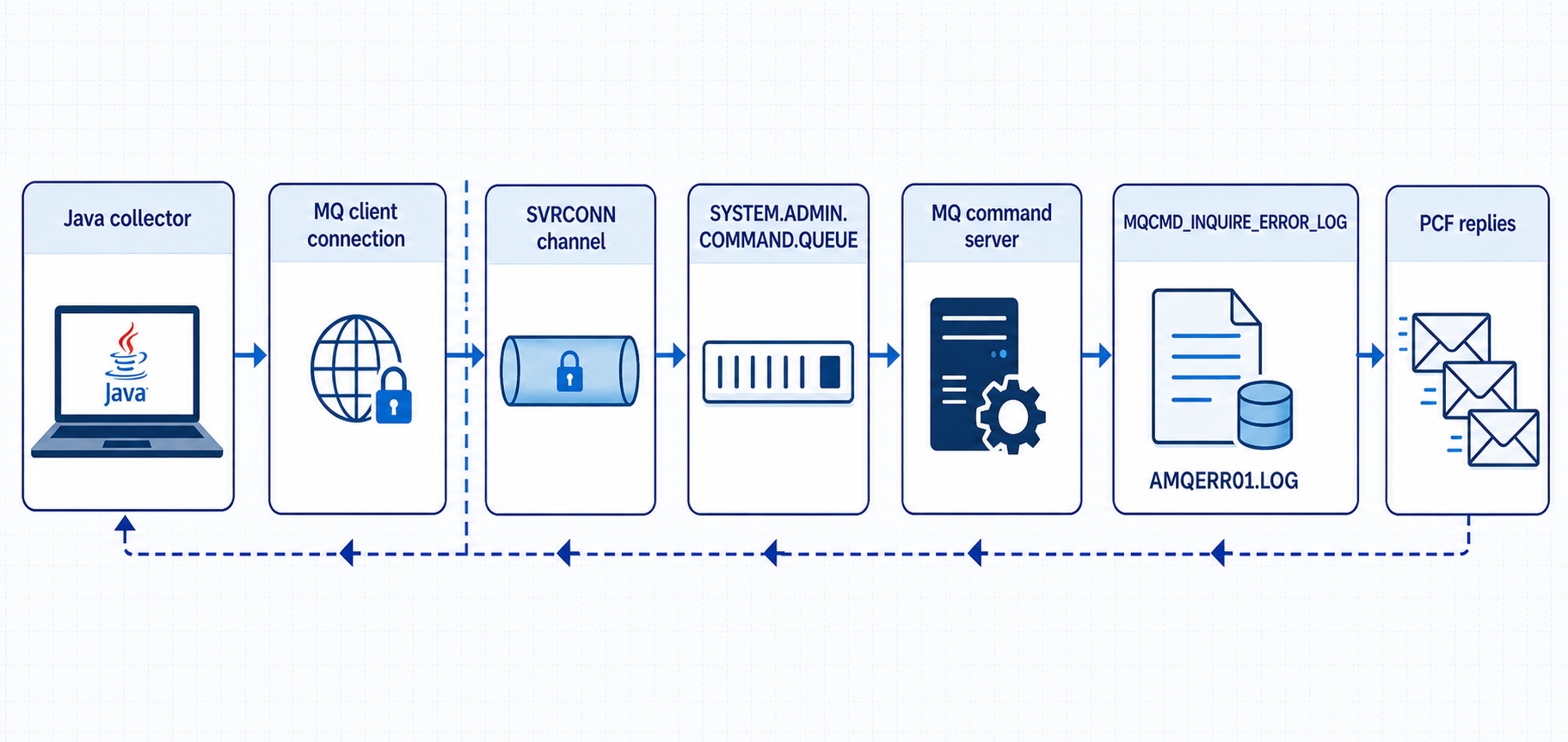
The Java PCFMessageAgent class handles command-queue access, reply queues, correlation, PCF encoding, and reply collection. The application still needs to:
- Establish an authenticated MQ client connection
- Construct the correct command and parameters
- Process every response message
- Check completion and reason codes
- Persist the final timestamp if incremental collection is required
3. Authorization model
IBM documents +ctrl authority on the queue manager object as the specific authority required to retrieve queue manager error logs. The identity also needs the normal permissions required to connect and use the PCF command path.
A representative queue-manager authorization record is:
setmqaut -m LOGQM -t qmgr -p pcfreader +connect +inq +ctrlDo not grant membership of the mqm group to a monitoring identity merely to make the command work. In production, create a dedicated identity, grant only the authorities it requires, and constrain the client channel with TLS and CHLAUTH rules.
This lab uses the developer image's administrative user so that the exercise stays focused on the new PCF command. A later section demonstrates the failure returned when +ctrl is absent.
4. Lab requirements
Use a disposable development machine with:
- Docker Engine or Docker Desktop
- Docker Compose v2
- At least 4 GB of free memory
- Internet access to
icr.io - An AMD64 Linux host, or Docker Desktop on Apple silicon with AMD64 emulation enabled
The lab pins the IBM MQ 10.0 developer image used by the preceding Docker article:
icr.io/ibm-messaging/mq:10.0.0.0-r2Pinning the image keeps the exercise repeatable. MQCMD_INQUIRE_ERROR_LOG is available because the queue manager is newer than the minimum 9.4.5 level.
5. Create the lab directory
Create an empty project:
mkdir -p "$HOME/mq-pcf-error-log-lab/config" \
         "$HOME/mq-pcf-error-log-lab/client"
cd "$HOME/mq-pcf-error-log-lab"
Record the image in .env:
cat > .env <<'EOF'
MQ_IMAGE=icr.io/ibm-messaging/mq:10.0.0.0-r2
EOF
Pull it explicitly:
set -a
. ./.env
set +a

docker pull --platform linux/amd64 "$MQ_IMAGE"
docker run --rm --platform linux/amd64 \
  --entrypoint dspmqver "$MQ_IMAGE"
Confirm that the output reports IBM MQ 10.0.0.0.
6. Configure the queue manager
The developer image can apply MQSC during queue-manager creation. Define a test queue and use the image's preconfigured administrative client channel.
Create config/20-config.mqsc:
cat > config/20-config.mqsc <<'MQSC'
DEFINE QLOCAL(LAB.EVENTS) DESCR('Queue used by the PCF error-log lab')
MQSC
The DEV.ADMIN.SVRCONN channel and the admin identity are created by the developer image when MQ_ADMIN_PASSWORD is supplied. They are conveniences provided for development; they are not a production channel design.
The MQ server image contains a Java runtime, but it does not contain javac. Build the client with a JDK image and retrieve IBM's MQ all-client JAR and its transitive runtime dependencies from Maven Central.
Create client/pom.xml:
cat > client/pom.xml <<'XML'
<project xmlns="http://maven.apache.org/POM/4.0.0"
         xmlns:xsi="http://www.w3.org/2001/XMLSchema-instance"
         xsi:schemaLocation="http://maven.apache.org/POM/4.0.0 https://maven.apache.org/xsd/maven-4.0.0.xsd">
  <modelVersion>4.0.0</modelVersion>
  <groupId>com.example</groupId>
  <artifactId>mq-pcf-error-log-client</artifactId>
  <version>1.0.0</version>
  <properties>
    <mq.client.version>10.0.0.0</mq.client.version>
  </properties>
  <dependencies>
    <dependency>
      <groupId>com.ibm.mq</groupId>
      <artifactId>com.ibm.mq.allclient</artifactId>
      <version>${mq.client.version}</version>
    </dependency>
  </dependencies>
</project>
XML
Create client/Dockerfile:
cat > client/Dockerfile <<'DOCKERFILE'
FROM maven:3.9.11-eclipse-temurin-21

ARG MQ_CLIENT_VERSION=10.0.0.0

COPY pom.xml /tmp/mq-client/pom.xml

RUN mvn -q -f /tmp/mq-client/pom.xml dependency:copy-dependencies \
    -Dmq.client.version=${MQ_CLIENT_VERSION} \
    -DincludeScope=runtime \
    -DoutputDirectory=/opt/mq

WORKDIR /work
ENTRYPOINT ["/bin/bash", "-lc"]
CMD ["sleep infinity"]
DOCKERFILE
Create compose.yaml:
cat > compose.yaml <<'YAML'
services:
  mq:
    image: ${MQ_IMAGE:-icr.io/ibm-messaging/mq:10.0.0.0-r2}
    platform: linux/amd64
    hostname: mq
    environment:
      LICENSE: "accept"
      MQ_QMGR_NAME: "LOGQM"
      MQ_ADMIN_PASSWORD: "passw0rd"
      MQ_APP_PASSWORD: "passw0rd"
    ports:
      - "1414:1414"
      - "9443:9443"
    volumes:
      - qmdata:/mnt/mqm
      - ./config/20-config.mqsc:/etc/mqm/20-config.mqsc:ro
    healthcheck:
      test: ["CMD-SHELL", "dspmq -m LOGQM | grep -q 'STATUS(Running)'"]
      interval: 5s
      timeout: 5s
      retries: 40

  pcf-client:
    build:
      context: ./client
      args:
        MQ_CLIENT_VERSION: "10.0.0.0"
    profiles: ["tools"]
    entrypoint: ["/bin/bash", "-lc"]
    command: ["sleep infinity"]
    volumes:
      - ./client:/work
    working_dir: /work
    depends_on:
      mq:
        condition: service_healthy

volumes:
  qmdata:
YAML
Start the queue manager:
docker compose up -d mq
docker compose ps
docker compose logs --tail 40 mq
Confirm its MQ level from the running container:
docker compose exec mq dspmqver7. Create the Java PCF client
The program supports three arguments:
ErrorLogReader [log-name] [after-isotime] [cursor-file]- With no arguments, it retrieves all of
AMQERR01.LOG log-namecan selectAMQERR01,AMQERR02, orAMQERR03after-isotimeenables incremental retrievalcursor-filestores the last timestamp returned by MQ
Create client/ErrorLogReader.java:
cat > client/ErrorLogReader.java <<'JAVA'
import java.nio.charset.StandardCharsets;
import java.nio.file.Files;
import java.nio.file.Path;
import java.nio.file.StandardOpenOption;
import java.util.Hashtable;

import com.ibm.mq.MQException;
import com.ibm.mq.MQQueueManager;
import com.ibm.mq.constants.CMQC;
import com.ibm.mq.constants.CMQCFC;
import com.ibm.mq.headers.pcf.PCFMessage;
import com.ibm.mq.headers.pcf.PCFMessageAgent;

public final class ErrorLogReader {
    private static final String HOST = env("MQ_HOST", "mq");
    private static final int PORT = Integer.parseInt(env("MQ_PORT", "1414"));
    private static final String CHANNEL = env("MQ_CHANNEL", "DEV.ADMIN.SVRCONN");
    private static final String QMANAGER = env("MQ_QMGR", "LOGQM");
    private static final String USER = env("MQ_USER", "admin");
    private static final String PASSWORD = env("MQ_PASSWORD", "passw0rd");

    private static String env(String name, String fallback) {
        String value = System.getenv(name);
        return value == null || value.isBlank() ? fallback : value;
    }

    public static void main(String[] args) throws Exception {
        String logName = args.length > 0 ? args[0] : "AMQERR01.LOG";
        String afterIsoTime = args.length > 1 ? args[1] : null;
        Path cursorFile = args.length > 2 ? Path.of(args[2]) : null;

        Hashtable<String, Object> properties = new Hashtable<>();
        properties.put(CMQC.HOST_NAME_PROPERTY, HOST);
        properties.put(CMQC.PORT_PROPERTY, PORT);
        properties.put(CMQC.CHANNEL_PROPERTY, CHANNEL);
        properties.put(CMQC.USER_ID_PROPERTY, USER);
        properties.put(CMQC.PASSWORD_PROPERTY, PASSWORD);
        properties.put(CMQC.TRANSPORT_PROPERTY, CMQC.TRANSPORT_MQSERIES_CLIENT);

        MQQueueManager queueManager = null;
        PCFMessageAgent agent = null;
        try {
            queueManager = new MQQueueManager(QMANAGER, properties);
            agent = new PCFMessageAgent(queueManager);

            PCFMessage request = new PCFMessage(CMQCFC.MQCMD_INQUIRE_ERROR_LOG);
            request.addParameter(CMQCFC.MQCACF_ERROR_LOG_NAME, logName);
            if (afterIsoTime != null && !afterIsoTime.isBlank()) {
                request.addParameter(
                    CMQCFC.MQCACF_ERROR_LOG_AFTER_ISOTIME,
                    afterIsoTime
                );
            }

            PCFMessage[] responses = agent.send(request);
            String lastIsoTime = null;

            for (PCFMessage response : responses) {
                String record = optionalString(
                    response,
                    CMQCFC.MQCACF_ERROR_LOG_RECORD
                );
                if (record != null) {
                    System.out.print(record);
                    if (!record.endsWith(System.lineSeparator())) {
                        System.out.println();
                    }
                }

                String responseTime = optionalString(
                    response,
                    CMQCFC.MQCACF_ERROR_LOG_ISOTIME
                );
                if (responseTime != null && !responseTime.isBlank()) {
                    lastIsoTime = responseTime;
                }
            }

            if (lastIsoTime != null) {
                System.err.println("LAST_ISOTIME=" + lastIsoTime);
                if (cursorFile != null) {
                    Files.writeString(
                        cursorFile,
                        lastIsoTime + System.lineSeparator(),
                        StandardCharsets.UTF_8,
                        StandardOpenOption.CREATE,
                        StandardOpenOption.TRUNCATE_EXISTING
                    );
                }
            }
        } catch (MQException e) {
            System.err.printf(
                "MQ failure: completionCode=%d reasonCode=%d%n",
                e.completionCode,
                e.reasonCode
            );
            throw e;
        } finally {
            if (agent != null) {
                agent.disconnect();
            }
            if (queueManager != null && queueManager.isConnected()) {
                queueManager.disconnect();
            }
        }
    }

    private static String optionalString(PCFMessage message, int parameter) {
        try {
            return message.getStringParameterValue(parameter);
        } catch (Exception absent) {
            return null;
        }
    }
}
JAVA
Why does optionalString tolerate an absent parameter? A PCF response does not have to place every response field in every chunk. The collector processes all reply messages and retains the last timestamp it sees.
8. Compile the client in Docker
Start the PCF client container:
docker compose --profile tools up -d pcf-clientThis step is required for the rest of the lab. The tools profile keeps the client container out of the initial queue-manager startup; enabling it here builds and starts the environment that provides javac, the Java runtime, and the IBM MQ client libraries. You only need to run the command again after bringing the container down or removing it.
Confirm that the JDK and downloaded all-client JAR are present:
docker compose exec pcf-client javac -version
docker compose exec pcf-client \
  find /opt/mq -name '*.jar' -print
Compile the program:
docker compose exec pcf-client bash -lc '
  javac -cp "/opt/mq/*" \
        ErrorLogReader.java
'
The client container is separate from the queue manager. Its /work directory is the host's client directory, and its connection to mq(1414) crosses the Compose network through DEV.ADMIN.SVRCONN.
9. Retrieve the active error log remotely
Run the client:
docker compose exec pcf-client bash -lc '
  java -cp ".:/opt/mq/*" \
       ErrorLogReader AMQERR01.LOG
'
The standard output contains the raw text returned from the queue manager. Standard error ends with a cursor similar to:
LAST_ISOTIME=2026-07-22T10:15:00.123456ZThe command did not mount /mnt/mqm from the queue-manager container. It obtained the log through an authenticated MQ client connection and a PCF request.
For comparison only, inspect the file locally inside the queue-manager container:
docker compose exec mq \
  tail -40 /var/mqm/qmgrs/LOGQM/errors/AMQERR01.LOG
The text returned by PCF should correspond to the queue manager's error log.
10. Generate a diagnostic event
An invalid client password is not a reliable way to create a queue-manager error-log record. Depending on the authentication path and diagnostic suppression settings, the failure might be visible in authority events, channel events, or container diagnostics without being written to the queue manager's AMQERR01.LOG.
Instead, create a sender channel whose destination is the deliberately closed local TCP port 1. Starting it produces a server-side channel connection failure that is handled by the queue manager.
docker compose exec -T mq runmqsc LOGQM <<'MQSC'
DEFINE QLOCAL(BAD.XMITQ) USAGE(XMITQ)
DEFINE CHANNEL(BAD.SDR) CHLTYPE(SDR) TRPTYPE(TCP) XMITQ(BAD.XMITQ) CONNAME('127.0.0.1(1)') SHORTTMR(30) SHORTRTY(3) LONGRTY(0)
START CHANNEL(BAD.SDR)
MQSC

sleep 5
Confirm that the channel is waiting to retry:
docker compose exec -T mq runmqsc LOGQM <<'MQSC'
DISPLAY CHSTATUS(BAD.SDR) ALL
MQSC
The expected result is STATUS(RETRYING). SHORTTMR(30) leaves a 30-second interval between short retries, while SHORTRTY(3) allows three attempts. That gives enough time to run the display command after the five-second wait. LONGRTY(0) prevents the deliberately broken channel from continuing with long retries after the short retry cycle ends.
Retrieve the log again with the correct credentials:
docker compose exec pcf-client bash -lc '
  java -cp ".:/opt/mq/*" \
       ErrorLogReader AMQERR01.LOG
'
Look for a channel connection message referring to BAD.SDR or 127.0.0.1(1), together with its explanation and action sections. The exact AMQ message identifiers can vary with platform and failure timing, so the lab does not depend on one identifier.
11. Implement incremental collection
Repeatedly downloading the complete active log is wasteful. The response timestamp allows a collector to ask only for records at or after its last checkpoint.
First capture a cursor:
docker compose exec pcf-client bash -lc '
  java -cp ".:/opt/mq/*" \
       ErrorLogReader AMQERR01.LOG "" last-isotime.txt \
       > first-read.log
'

cat client/last-isotime.txt
Stop and restart the deliberately broken sender channel to generate another queue-manager diagnostic event:
docker compose exec -T mq runmqsc LOGQM <<'MQSC'
STOP CHANNEL(BAD.SDR) MODE(FORCE)
START CHANNEL(BAD.SDR)
MQSC

sleep 5
Use the saved cursor in the next request:
CURSOR=$(tr -d '\r\n' < client/last-isotime.txt)

docker compose exec pcf-client bash -lc "
  java -cp \".:/opt/mq/*\" \
       ErrorLogReader AMQERR01.LOG '$CURSOR' last-isotime.txt \
       > incremental-read.log
"

cat client/incremental-read.log
cat client/last-isotime.txt
IBM MQ applies greater-than-or-equal semantics to the timestamp. The record at the checkpoint can therefore appear again. A production collector should be idempotent: retain enough information to suppress a duplicate boundary record, or accept duplicates and deduplicate them downstream.
Never advance the stored cursor before all PCF reply chunks have been processed successfully. Otherwise, a crash between updating the cursor and persisting the records can create a monitoring gap.
12. Select a log by name
IBM MQ writes current queue-manager errors to AMQERR01.LOG. On AIX, Linux, and Windows, when that file reaches its rotation threshold, older data moves through AMQERR02.LOG and AMQERR03.LOG.
The fresh Docker lab has not produced enough error data to rotate the log, so AMQERR02.LOG normally does not exist yet. First, demonstrate explicit log selection with the active file:
docker compose exec pcf-client bash -lc '
  java -cp ".:/opt/mq/*" \
       ErrorLogReader AMQERR01.LOG
'
On a queue manager where rotation has occurred, use the same command with AMQERR02.LOG or AMQERR03.LOG. An empty result for either name can simply mean that the corresponding rotated file has not been created, so it is not an error in this fresh lab.
Only the three queue-manager error-log names are valid. The command is not a general-purpose remote file reader, which is an important part of its security boundary.
13. Production collector design
A useful collector is more than a loop that prints text. Consider these properties:
| Consideration | Production guidance |
|---|---|
| Checkpointing | Store one cursor per queue manager and log name. Update it only after all returned chunks have been delivered durably. |
| Rotation | Polling only AMQERR01.LOG can miss records if the file rotates while a collector is offline. Track queue managers continuously and define a recovery policy that can inspect AMQERR02.LOG when a cursor no longer covers the active file. |
| Duplicate handling | Because the AfterIsoTime comparison is inclusive, make downstream ingestion idempotent. Timestamp alone might not uniquely identify an error record. |
| Back pressure | Each reply can contain up to 1 MB of raw text. Stream or process replies as promptly as the client API allows and place sensible limits on memory, retries, and output buffering. |
| Security | Use a dedicated monitoring identity; grant +ctrl only where log retrieval is required; enable TLS with peer validation; scope CHLAUTH rules to the collector; protect credentials or use token-based authentication; and apply network controls around the administrative channel. |
| Parsing | The PCF response contains raw log text. Preserve the original text for diagnosis. If structured fields are required, parse a copy downstream and retain the source record so that parser changes do not destroy evidence. |
14. Troubleshooting
The command is not recognized
Confirm the queue manager is IBM MQ 9.4.5 or later:
docker compose exec mq dspmqverAn older client JAR can also lack the new command and parameter constants. Keep the PCF client libraries at a compatible current level.
Reason code 2035
MQRC_NOT_AUTHORIZED means the connection identity, channel mapping, or object authorities are insufficient. Check:
- The user reaching the queue manager after CHLAUTH mapping
+connect,+inq, and especially+ctrlon the queue manager- Access required by the PCF command path
- Whether a privileged identity is blocked by channel rules
Do not disable CHLAUTH as a permanent fix.
No new record appears
Not every client-side error creates a queue-manager error-log entry. A failure that occurs before reaching MQ, such as DNS resolution or a refused TCP connection, is local to the client. Generate a failure that reaches the queue manager, then inspect the container log and AMQERR01.LOG directly.
Incremental output repeats one entry
That is consistent with the documented greater-than-or-equal timestamp behavior. Deduplicate the boundary record or tolerate it downstream.
The tools container exits immediately
Start it with the Compose profile used in the article:
docker compose --profile tools up -d pcf-client15. What the lab demonstrated
The important result is not simply that Java can print an MQ log. The lab establishes a different operational model:
- The collector connects as an MQ client
- MQ authorization controls access
- The command exposes only queue-manager error logs
- Large results are returned as multiple PCF replies
- A server-provided timestamp supports incremental polling
- The collector does not need host or volume access
This makes MQCMD_INQUIRE_ERROR_LOG suitable for centralized diagnostic collection across queue managers whose storage is private, containerized, or managed by another team.
16. IBM documentation
- What's new in IBM MQ 9.4.5 for Multiplatforms
MQCMD_INQUIRE_ERROR_LOGrequestMQCMD_INQUIRE_ERROR_LOGresponse- Error logs on AIX, Linux, and Windows
- Introduction to IBM MQ Programmable Command Formats
17. Cleanup
Stop the containers and remove the queue-manager volume:
cd "$HOME/mq-pcf-error-log-lab"
docker compose --profile tools down -v
Remove the lab files when they are no longer needed:
cd "$HOME"
rm -rf "$HOME/mq-pcf-error-log-lab"